Animation Production Studio
- Overview
- Step 1: Ideation and Forming Teams
- Step 2: Team Member Roles
- Step 3: Animation Pipeline
- Ongoing: Team Evaluations
- Step 4: Team Presentation
- Step 5: Final Submission
- Student Work Examples
- Reading List and Reference
- Course Syllabus
Course Description
In ART 3081, students continue building upon the competencies developed in ART 3080. This course focuses on animation production through group production, individual production, and discussions in media history and theory. Students will assemble teams, each working together to complete all steps of the animation workflow to create an animation short.
Student Learning Outcomes
- Employ the basic principles, concepts, tools, techniques, procedures, and technologies sufficient to produce animation art from concept to a finished product that communicates ideas and/or stories to a viewer or an audience.
- Recognize the principles of animation, including its visual, spatial, sound, motion, and temporal elements and features, and how these elements are combined in the development of animation art.
- Collaborate and communicate with all members of teams at multiple stages of animation project development and in associated production processes.
Course Outline
- Assemble teams and develop story
- Complete all steps in the animation pipeline
- Presentation
Step 1 | Discussion: Beginning Ideation and Forming Teams
Begin this discussion by sharing any ideas you have for the animated short. There are no wrong or binding answers, just ideation and hopefully some beginnings of group formation.
What animation technique would you like to work with? 2D, 3D, Stop Motion
What genre? Style? Theme? Audience?
Do you have a story idea? Don’t be afraid to share!
Does the story develop around:
- Characters
- Locations
- Events
What parts of the process of creating an animated short do you most enjoy and are most comfortable performing?
Story, Character Development and Design, Storyboarding, Sound Design, Environment and Asset Design, Animating, After Effects etc.
If 3D, Modeling, Rigging, Animating, Lighting, Rendering etc.
You might also list the software you are comfortable working in.
Read your classmates responses and add your thoughts and suggestions.
We will continue the discussion and formally form teams during class.
Step 2 | Determine Team Member Roles
Team Member Roles:
Additional tasks will likely be added to each role as the team begins working.
- Project Manager: Leads the group, makes sure that all group voices are heard and considered, assigns activities, draws together the various activities of team members, and leads group meetings.
- Recorder: Documents key points discussed in meetings. Documents tasks assigned, and to whom. Makes sure that workload is fairly distributed. Evaluates decisions and make sure they match the goals of the group. Keeps a team member contribution log to be turned in bi-weekly.
- Materials Manager: Collects and manages digital copies of all process work and project files. Makes sure deadlines are met.
- Planner: Prepares timelines and schedules; organizes and makes sure the group is progressing as planned.
Dysfunctional roles:
Unfortunately, sometimes you may find either yourself or other team members take on roles that are disruptive to team effectiveness and satisfaction. Some of these roles include:
- being aggressive
- blocking or nit-picking
- competing
- getting off the task to disrupt the work of the group
- withdrawing
- being sarcastic or cynical
- blaming
- taking all the credit
- dominating
- manipulating
It is crucial that the team communicate effectively! Be mindful that you are not taking on dysfunctional roles. If team members are being disruptive, it is important that you attempt to resolve the issue as soon as possible. Record disruptive occurrences in bi-weekly team evaluations. When necessary, do not hesitate to discuss team dynamic issues with your professor.
Step 3 | Complete the Animation Pipeline
Process
Below are the steps needed to complete the animation pipeline. Completion of all steps is required.
- Story structure
Identify your main idea and create a storyline. Consider tone, plot, and theme. Decide what your story is really about. On cue cards or post it notes, write down/sketch down the beats (all the moments or action steps that move your story forward). Lay beats out in chronological order in three separate rows. The three rows represent the traditional three-act storytelling structure (perfectly suited for shorts), a linear story with three basic steps or acts:
1. A character has a problem.
The first row of beats should introduce the character(s), establish what they want, and also introduce a problem standing in the way of what they want.
2. The character works towards a solution.
The second row is where the character attempts to overcome the problem. The character commits to solving their problem and comes up against all sorts of roadblocks that make solving it seems unlikely.
3. Character solves the problem, usually in a surprising way.
The third row is the resolution, the character facing the problem and delivers an unexpected resolution.
Next, create a fourth row of “additional beats” that you may not know what to do with and may or may not use.
- Previsualization
Create a “References” file and in it, collect pertinent influences and inspiration. Establish design direction (the look and feel of the project), animation techniques, and methods.
Develop a style guide for the team to reference and to facilitate a cohesive style for the animation.
- Character development
One of the most important stages of pre-production. In character design, the process of exploring, sketching, and experimenting is crucial. Take time to read the following:
Creative Character Design by Brian Tillman
- Character model sheets
Once the character(s) are developed and refined, a character model sheet for each character is made. A model sheet is a combination of the turnaround, facial expressions, head turns, and action poses, and descriptions of anything about the character’s appearance that is important.
- Storyboard
Begin creating thumbnail sketches, revise thumbnails.
Storyboard keeping in mind shot composition, framing, the rule of thirds, staging, transitions, and continuity (spatial, temporal, directional). Determine a realistic running time, break the story into acts, and establish how many seconds each should be.
There should be a thumbnail storyboard and a final storyboard.
The frames in the final storyboard should match the aspect ratio of the resolution you are planning for the final animation.
Insert several style frames to communicate the mood, color palette, and texture of the project.
- Sound design
Don’t let your sound become an afterthought! Consider your soundtrack at the same time as writing and designing the pre-production timeline.
- Animatic
Scan and import storyboards into an editing program and create an honest timeline of your entire story. Edit, if a beat is too long, shorten it. If a beat seems expendable and you need the time, get rid of it. You may find that you need to create an additional visual beat. Add sound (dialogue, music, sound effects).
Creating an animatic using Adobe After Effects
- Color script
Consider hue, saturation, and value. Make color scripts to emphasize key moments.
Tips:
Limit your palette
Support (don’t upstage) your subject
Select one thematic and one accent color
Use saturation mindfully
Use surprise color for punctuation
Design for movement
- Environment and asset design
Give your audience a clear sense of time and place. Be sure to choose the time and place that will help create the best story and fill your environment with details that will facilitate interesting conflicts in your story.
Tips:
Design consistent rules
Define time and space
Consider physical laws
Consider social laws
Define visual laws
- Style Frames
Illustrate the most significant moments from your storyboard and refine them so that they are in the correct aspect ratio and present what the finished animation will look like.
- Character models (3D)
- Environment and asset models (3D)
- Animation
- Output
Lighting, rendering, aftereffects, exporting.
Ongoing | Team Evaluations
Team evaluations will be submitted by all members bi-weekly.
Your answers will be viewable only to me, please be honest and informative. If there is a conflict within your team, please let me know so that I can intervene if needed.
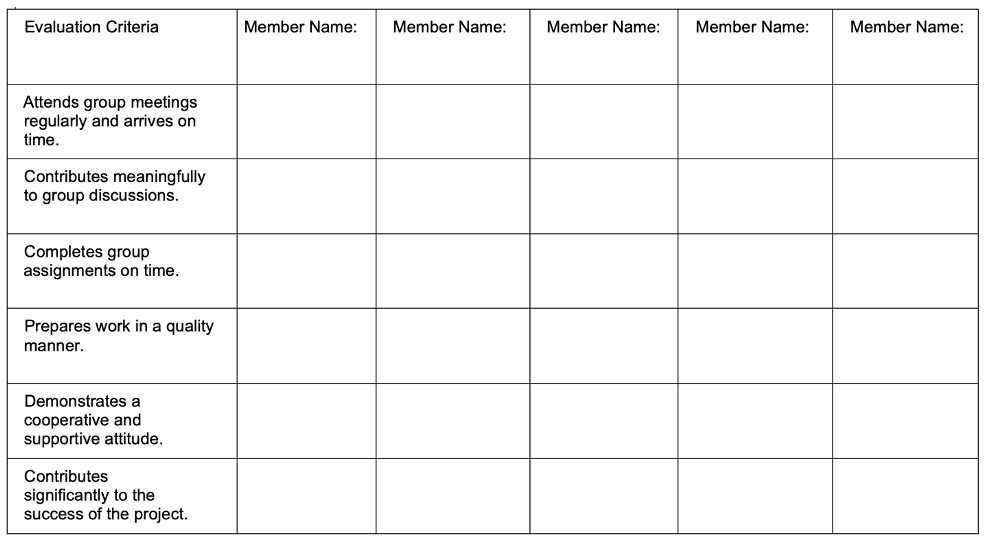
Team Evaluation
Your name:
Write the name of each of your group members in a separate column. For each person, indicate the extent to which you agree with the statement on the left, using a scale of 1-4 (1=strongly disagree; 2=disagree; 3=agree; 4=strongly agree).
Feedback on team dynamics:
1. How effectively is your group working?
2. Were the behaviors of any of your team members particularly valuable or detrimental to the team? Are there any changes your group could make to improve productivity? Explain.
3. Are there any changes your group could make to improve productivity?
Step 4 | Team Presentation
Using Adobe Express, create a presentation that documents the process and production of your team’s animated short.
Adobe Express is a simple-to-use application that allows you to easily turn your ideas into a post, page, or video. Adobe Express Spark Page creates web stories combining text, graphics, and video.
Once your team has created the Spark Page, each member will be able to embed the Spark Page URL into their portfolio website and have a lovely presentation showing that you have experience working in a team!
This documentation will be precious when you begin applying for jobs in the industry. You will want to be sure to create a professional presentation. Make sure that your organization is excellent. Your documentation is excellent. And your written content uses proper grammar and is perfect (compose your text in Grammarly before pasting it into your Spark Page). Be sure to give your teammates credit for their contributions properly.
One member will need to begin the project using their Adobe ID and then invite the remaining members to collaborate so that your team can work together on the Spark Page.
Adobe Express Information
Adobe Express Tutorials
Inspiration
Below are examples of professional project presentations.
Step 5 | Final Submission Group Folder
Final Requirements for ART3081 due at the time of the course final
1. As a group, collectively, create a folder containing documentation of all process work and the final video.
Acceptable files: JPEG, MP3, H.264, PDF, MP3, .doc, etc.
Please do NOT include project files (.psd, .ai, .mb, .prproj, etc.
2. Finalize your group contribution log, make sure that you all agree on it, and that it adequately represents each member’s contribution to the entire project. Include this in the group folder.
Upload your group’s folder to the designated class OneDrive folder:
ART3081 Student Work Examples
Culimancy https://express.adobe.com/page/jy97w5wdriH58/

Slice of Death https://express.adobe.com/page/JUF6InhGxxJgZ/

Homebound Hermit https://new.express.adobe.com/published/urn:aaid:sc:US:926ed8f8-0c4a-407c-b2fe-324acad71588
Wick’s Waxy Fix
Welcome to the Internet
Delivery Disrupted
Wizards in Training
Orphans https://express.adobe.com/page/elPnzvETBbZKe/

Appendix
- Reading List and Reference
- Syllabus
Reading List and Reference
Creative Character Design by Brian Tillman
Bloop Animation: Creating an Animatic using Adobe After Effects https://www.bloopanimation.com/animatic/
Learning Adobe Express (LinkedIn Learning) https://www.linkedin.com/learning/learning-adobe-express-24645131/great-designs-made-easy?u=76264346
Collaborate on Adobe Express https://helpx.adobe.com/express/share-and-publish/share-and-collaborate/invite-collaborator.html
Copy Files Between Accounts in Adobe Express https://helpx.adobe.com/express/share-and-publish/share-and-collaborate/copy-files.html
Syllabus
ART3081 Animation Production Studio
Course Description
In ART 3081, students continue building upon the competencies developed in ART 3080. This course focuses on animation production through group production, individual production, and discussions in media history and theory. Students will assemble teams, each working together to complete all steps of the animation workflow to create an animation short.
Student Learning Outcomes
- Employ the basic principles, concepts, tools, techniques, procedures, and technologies sufficient to produce animation art from concept to a finished product that communicates ideas and/or stories to a viewer or an audience.
- Recognize the principles of animation, including its visual, spatial, sound, motion, and temporal elements and features, and how these elements are combined in the development of animation art.
- Collaborate and communicate with all members of teams at multiple stages of animation project development and in associated production processes.
Required Materials
- A portable Hard Drive, 1TB SSD
- A pair of headphones
- Wacom Screen Tablet Pen / or a digital drawing tablet for working outside of class.
Currently, there are two pen options for students to purchase:
Wacom Pro Pen 2 and Wacom Pro Pen Slim
Software
Students will be instructed on using Adobe CC software for a portion of this course. If you have not already signed up for your free Adobe CC account, you may do so here:
Course Conduct
This is a face-to-face studio course. Your attendance, in person, is expected. Classroom time represents lectures, instructor demonstration, class exercises, design and production assignments, work on projects, and critique.
Most course content will be available on Canvas. Additional communication and collaboration platforms such as Microsoft Teams, Discord, and Cisco Webex will also be accessed. To download the Cisco Webex App: https://ecu.teamdynamix.com/TDClient/1409/Portal/KB/ArticleDet?ID=67446
Students may be required to engage in online discussion forums and to engage in all activities by deadlines posted. When posting on the discussion boards and chat rooms, it is essential to understand how to interact online and use proper netiquette. You can read more about the rules of netiquette here: http://www.albion.com/netiquette/corerules.html
Class Expectations
I seek to create an environment in which individuals can openly share their thoughts, viewpoints, and ideas.
- Attendance and participation is absolutely mandatory. Your group is depending on you! Missing more than TWO Classes will result in a Grade Reduction. Missing FIVE Classes will result in a grade of “F” for the course regardless of the project grade.
- Students are expected to actively contribute to the completion of their group’s work as well as class discussions. Individual participation and conduct will count as a significant portion of each student’s final grade.
- If a group member is not fairly contributing to the group, does not conduct themselves appropriately, and/or has excessive absences, they will be removed from the group and will be required to complete supplemental assignments.
Assignments
As your group begins the pre-production phase, determine the strengths of individual members, and assign jobs accordingly. The group will keep track of each member’s work and will also keep a proposed calendar of due dates. Each individual group member is expected to contribute their fair share to the project and will receive an individual grade based on their performance.
Attendance Policy
For information on university excused absences see: https://deanofstudents.ecu.edu/home/university-excused-absence/
Attendance is mandatory and missing more than TWO Classes will result in a Grade Reduction. Missing FIVE Classes will result in a grade of “F” for the course regardless of the project grade.
- Students must be in class on time, arriving late to class three times will count as an unexcused absence. Missing more than 15 minutes of class time will be considered an unexcused absence; this includes leaving class early w/o permission.
- Students must come to class prepared! They should have the required materials and due assignments. Arriving unprepared may result in an unexcused absence.
- Missing class during a critique will result in an unexcused absence and an F for the due assignment.
Computer Lab Rules
Students must abide by the following rules. Failure to do so may result in the student being asked to leave the classroom for the remainder of the class period with the result of an unexcused absence.
- Food and drink are NOT allowed in studios and computer labs. This policy applies to the entire school. Students can eat snacks and food in the student lounge (room 208). This policy includes after-hours!
- During class, cell phones must be silenced and put away.
- During class, the lab computers are to be used for coursework for this course only.
- All lab equipment must be treated appropriately, and students are expected to clean up after themselves.
Project Evaluation
Projects are evaluated on the following criteria:
- 25% Fulfillment of assignment objectives
- 25% Technical execution
- 25% Conceptual and physical investment of time
- 25% Aesthetic and conceptual quality of the finished work
Letter Grading
Letter grades will be assigned based on the number of points earned from assignments. See the conversion table below.
| Grading Scale | |||
| Grade | Grade Scale | GPA | |
| A | 93-100 | 4.0 | Achievement substantially exceeds basic course expectations |
| A- | 90-92.99 | 3.7 | |
| B+ | 87-89 | 3.3 | |
| B | 83-86.99 | 3.0 | Achievement exceeds basic course expectations |
| B- | 80-82.99 | 2.7 | |
| C+ | 77-29.99 | 2.3 | |
| C | 73-76.99 | 2.0 | Achievement adequately meets basic course expectations |
| C- | 70-72.99 | 1.7 | |
| D+ | 67.69.99 | 1.3 | |
| D | 63-66.99 | 1.0 | Achievement falls below basic course expectations |
| D- | 60-62.99 | .7 | |
| F | 0-59.99 | 0 | Failure – achievement does not justify credit for the course |
| I* | Incomplete | * | (granted for deficiency in quantity, not quality, of work) |
Office Hours and Contact Information
Office hours: J1309, MW 7-8 am and TTH 12:30-2 pm or virtually by appointment: https://ecu.webex.com/meet/mcintyrea. The best method to contact me is by email mcintyrea@ecu.edu which I check regularly. Please enter “Art 3082” in the subject line of your message. Describe the nature of the problem that you are having as entirely as you can. During regular working days M-F and working hours (8 am-5 pm), I will do my best to respond within that day. During other times there may be a 24-hour delay. If you would like to schedule a meeting with me outside of my regular office hours, please include your availability.
Academic Integrity Policy
http://www.ecu.edu/cs-acad/fsonline/customcf/currentfacultymanual/part6section2.pdf
The policy is also available to students at this link: http://www.ecu.edu/osrr/students-academic_conduct_process.cfm
Also, see information on webpage for student’s rights and responsibilities: http://www.ecu.edu/osrr/
As a member of the ECU community, students are expected to uphold this value on a daily basis. Academic integrity is important to your education and learning and the integrity of your degree and that of the entire university community. As a member of this academic community, you are expected to: Review the entire Academic Integrity Policy; Consult a faculty member if you are unsure if a behavior is a violation of the Academic Integrity policy; If you observe an academic integrity violation, report it to the faculty member immediately.
Academic integrity is a fundamental value of higher education and East Carolina University; therefore, acts of cheating, plagiarism, falsification, or attempts to cheat, plagiarize or falsify will not be tolerated. Should I determine that an academic integrity violation has taken place, I reserve the right to assign a grade penalty or refer the case to the Office of Student Rights and Responsibilities for an Academic Integrity Board hearing. The minimum grade penalty that I will assign is an F for the assignment/course. Should it come to my attention that you have had a prior academic integrity violation or other aggravating circumstances, I will refer the case directly to the Office of Student Rights and Responsibilities. Should the Academic Integrity Board determine that you committed an academic integrity violation, you may be assigned a grade penalty and any other sanction allowed in the Student Code of Conduct, up to and including suspension from the University.
Regarding the use of AI/ChatGPT
Intellectual honesty is vital to an academic community and for my fair evaluation of your work. All work submitted in this course must be your own, completed in accordance with the University’s academic regulations. You may not engage in unauthorized collaboration or make use of ChatGPT or other AI composition software.
Disruptive Academic Behavior and Student Code of Conduct
Disruptive academic behavior is any behavior likely to substantially or repeatedly interfere with the normal conduct of instructional activities, including meetings with instructors outside of class. Examples of such behavior include, but are not limited to, making loud or distracting noises; using cell phones and other electronic devices without prior approval; repeatedly speaking without being recognized; frequently arriving late to class, and making threats or personal insults. The course instructor has purview over his/her class and may deny a student who is unduly disruptive the right to attend the class.
Academic Accommodations Statement
Academic accommodations may be available to students including access to assistive technology and testing accommodations. Students should contact Disability Support Services (DSS) to discuss possible assistance during their recovery period. DSS can be reached at (252) 737-1016 or Dss.dept@ecu.edu. Use the following link to file with the Department for Disability Support Services: https://accessibility.ecu.edu/students/
Pirate Safety Guide
Emergency Weather Statement
In case of inclement weather or emergency ECU will post information at the following website: http://www.ecu.edu/alert/
Continuity of Instruction
If face-to-face classes are suspended due to a catastrophe or other serious event, I will do my best to continue instruction to those that can participate. When classes are suspended, you will receive an email from me and an announcement on Canvas, both will detail how we will proceed.
Missed Instructional Time in the Event of a Disruption:
Making up missed instructional time in this course will follow ECU’s Policy for Making Up Missed Instructional Time Due to Suspension of Instruction.
Assessment
In this course, you will be asked to participate in assessment activities that are not graded as part of your course requirements.
Caveat Statement
This syllabus represents a written contractual agreement between us. Occasionally, it may be necessary to revise this syllabus to meet students’ needs. I reserve the right to revise this syllabus if the need arises. Advance notification will be provided to you.
 cagedflight