Introduction to Interactive Design
- Overview
- Module 1: Board Game Redesign
- M1_Assignment 1 / M1_Assignment 2 / M1_Assignment 3 / M1_Assignment 4 / M1_Assignment 5 / M1_Assignment 6
- Module 2: 2D Video Game Design
- M2_Assignment 1 / M2_Assignment 2 / M2_Assignment 3 / M2_Assignment 4 / M2_Assignment 5 / M2_Assignment 6 / M2_Assignment 7
- Reading List and Reference
- Course Syllabus
Course Description
This course provides students with a theoretical and conceptual understanding of the field of game design and practical exposure to designing a game. Topics covered include iteration, mechanics, dynamics, flow theory, the nature of fun, game balance, and user interface design. The primary focus is on 2D asset creation and game design documentation.
Student Learning Outcomes
Acquire and apply a proficient understanding of game design.
Practice creative concept process through research, design, and development of a game design document. Demonstrate advanced analysis and exploration of an existing game and level design.
Critically analyze students’ artistic development, comfortably consider criticism, and critique peers’ work. Apply problem-solving skills and make revisions based on this feedback.
Course Outline
- Board Game Redesign: Research and choose a board game to redesign. Design three new mechanics for the game. Create artwork to showcase the new mechanics. Develop an animation illustrating how the new mechanics work. Produce a Game Pitch to explain the new mechanics and showcase artwork and animation.
- Design a 2D video game, focusing on character design and concept art and creating a game design document.
Module 1 | Overview
Board Game Redesign
In Module 1: Board Game Mechanics you will redesign the mechanics of an existing board game.
One of the first things that designers attempt to do with a new design is outlining the mechanics of the game. Specifically, they’re trying to determine what players will be doing throughout the game and how they’ll accomplish it.
Game mechanics are the systems that move your game from beginning to end. They give your game structure and guide players down various paths toward victory. At their most basic, game mechanics are the rules and systems that govern player interactions within a game. These make up the core building blocks for games.
Put simply, game mechanics are your ‘how’. It’s what you are allowed/required to do and when. It is also the restrictions you will put on the players as they try to achieve their goals. Those restrictions are defining what players may do and the paths they may take. In other words, it tells players what options are available to them and it’s up to them to determine how to use those mechanics to achieve victory.
To understand a game mechanic, first it’s essential to be familiar with gameplay. Gameplay is essentially how the player interacts with the game.
When you think about a game’s rules, plot, objectives, challenges, and how the player is meant to interact with them, you’re thinking about the gameplay.
Game mechanics help provide gameplay by providing a construct of methods or rules designed for the player to interact with.
Overview of What You Will Do
- Watch Videos – “Board Game Mechanics” and “5 Great Game Mechanics”
- Read Articles – “How to Learn Board Game Design and Development,” “Board Game Mechanics,” and “Board Game Mechanics 101 an Introduction to Core Gaming Mechanics.”
- Complete Quizzes – based on the videos, articles, and chapters.
- Research and choose a board game to redesign
- Design a minimum of three new mechanics for your game
- Create all artwork to showcase your new mechanics
- Develop an animation illustrating how your new mechanics work in the game
- Produce an “elevator” pitch (Game Pitch) explaining the new mechanic (including all artwork and animations) in Adobe Express
- Submit the link in Canvas
Board Game Redesign Process
Research and begin gathering notes about your game’s theme and existing mechanics. Lean heavily on the information gained from the articles and chapters you have read to describe your chosen game and make decisions about possible design changes.
Then remove a significant mechanic and play the game. Record that experience, discuss whether that element is essential or unimportant. Decide if you will add it back in or replace it.
Next, prototype the new mechanics and play the game. It might be valuable to prototype one at a time before combining them. Record the experiences of each additional mechanic, discuss how each affects gameplay. Decide if you will keep it or discard it. Continue until you have a minimum of 3 new mechanics.
Once you have at least 3 new mechanics combine them and play the game. Record the experience, discuss how the combined mechanics affect gameplay. Write out the rules detailing changes based on the new mechanics.
The goal is to come up with game mechanics that are engaging enough to either entertain a player or give them an impacting and worthwhile experience.
The next step is to develop artwork beginning with sketching out all game pieces (tokens, cards, boards, etc.) individually, and how they are incorporated into the game. Once through development and exploration sketches are done, begin final detailed artwork. With the artwork finalized, animate each new mechanic. Requirements are listed in the assignments for each.
The final product for Module 1: Board Game Redesign is a Game Pitch that includes all your work.
Assignment 1 | Mechanic Concept Sketches
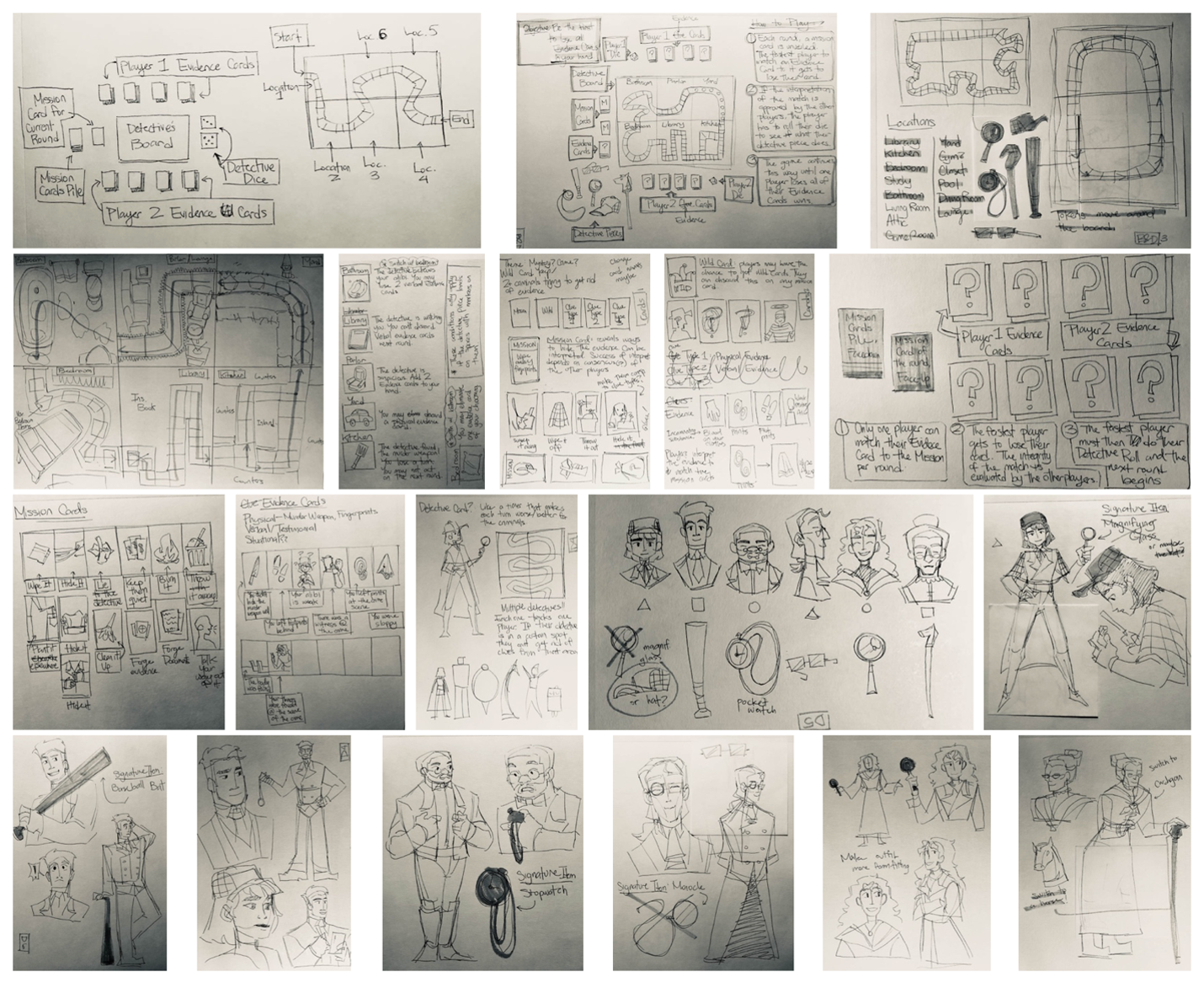
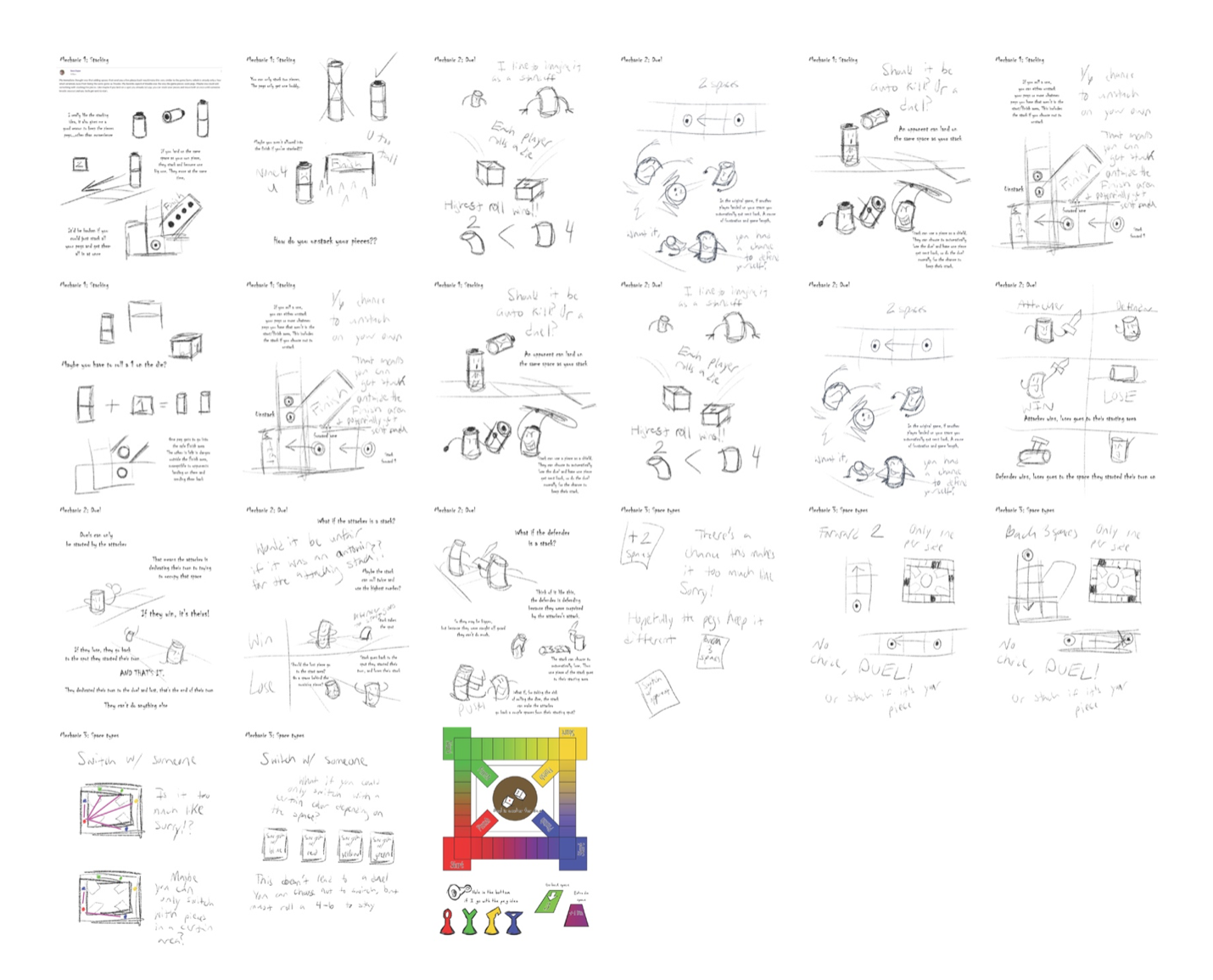
Required Sketches:
- Minimum of 3 different new mechanics
- For each new mechanic submit multiple pages (minimum 5 per mechanic) each with numerous thumbnail sketches that show exploration and development — label clearly. (15 total pages due)
- For each new mechanic submit at least 3 full-page (minimum 1 per mechanic) detailed sketches illustrating the mechanics in gameplay — label clearly. (3 pages total)
- Name your files “YourLastName.jpg” (for example “McIntyre_thumbnail01.jpg”)
IMPORTANT: If you are photographing your sketches, take the time to shoot them in decent light, make sure the perspective is not skewed and crop out the background. If the page of sketches you are photographing is horizontal, make sure that the image you upload is also horizontal. Your sketches are only as good as the documentation that you submit!

Student Examples
Pasion
Fisher
Brundage

Grant
Assignment 2 | Final Mechanic Artwork
Final Mechanic Artwork Requirements
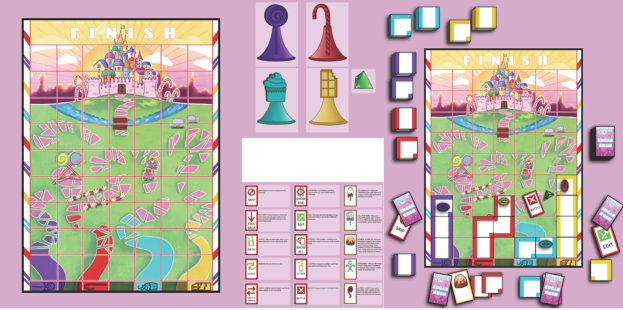
- Submit multiple full-color illustrations (not sketches) of each mechanic detailing all sides/angles (minimum of 3 mechanics, one mechanic per page showing multiple views).
- Submit one detailed, full-color illustration of each mechanic in gameplay (one per page, 3 pages total)
- Clearly label all pages
Name your files “YourLastName_final-artwork-01.jpg” through “YourLastName_final-artwork-06.jpg“
Student Examples
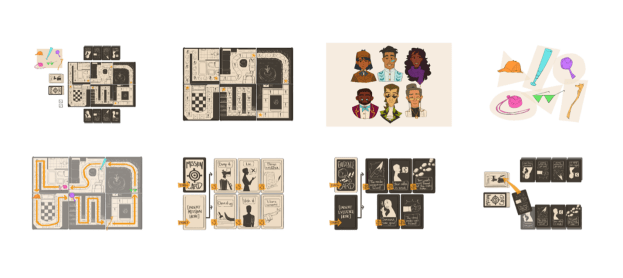
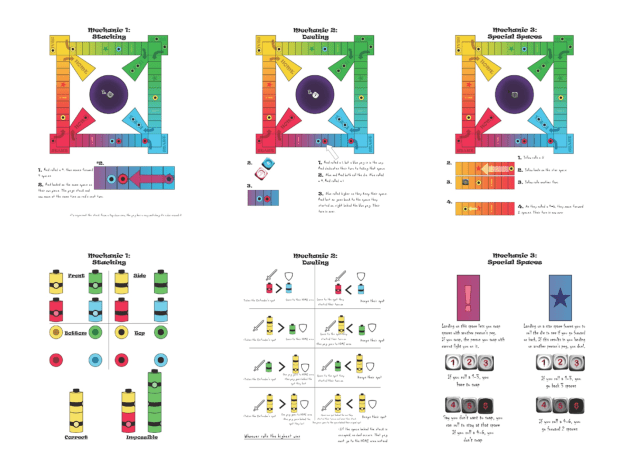
Tunau-Spencer_final-artwork.pdf

Assignment 3 | Adobe Animate Tutorial
During this phase of Module 1, you will animate your new mechanics with Adobe Animate CC.
To get started select one of the following tutorials to complete. Download the exercise files provided with the tutorial to complete all the steps.
- Adobe Animate Essential Training (Links to an external site.)
- If you choose to complete and submit Adobe Animate Essential Training complete these videos. Name your file “YourLastName_AET.fla”
- 1. Getting Started with Animate
- 2. Animating Original Content
- 3. Additional Animation Concepts
- If you choose to complete and submit Adobe Animate Essential Training complete these videos. Name your file “YourLastName_AET.fla”
- TipTut’s Intro to Adobe Animate Series
- If you choose to complete and submit Intro to Adobe Animate complete these videos. Name your file “YourLastName_IAA.fla”
- Intro to Adobe Animate [1/4] | Beginners Tutorial https://www.youtube.com/watch?v=7huMYp7WpsI
- Intro to Adobe Animate [2/4] | Beginners Tutorial https://www.youtube.com/watch?v=wpmNclYMWTc
- Intro to Adobe Animate [3/4] | Beginners Tutorial https://www.youtube.com/watch?v=P6kgdGBzgS4
- Intro to Adobe Animate [4/4] | Beginners Tutorial https://www.youtube.com/watch?v=Hv2ZOd8fFAg
- If you choose to complete and submit Intro to Adobe Animate complete these videos. Name your file “YourLastName_IAA.fla”
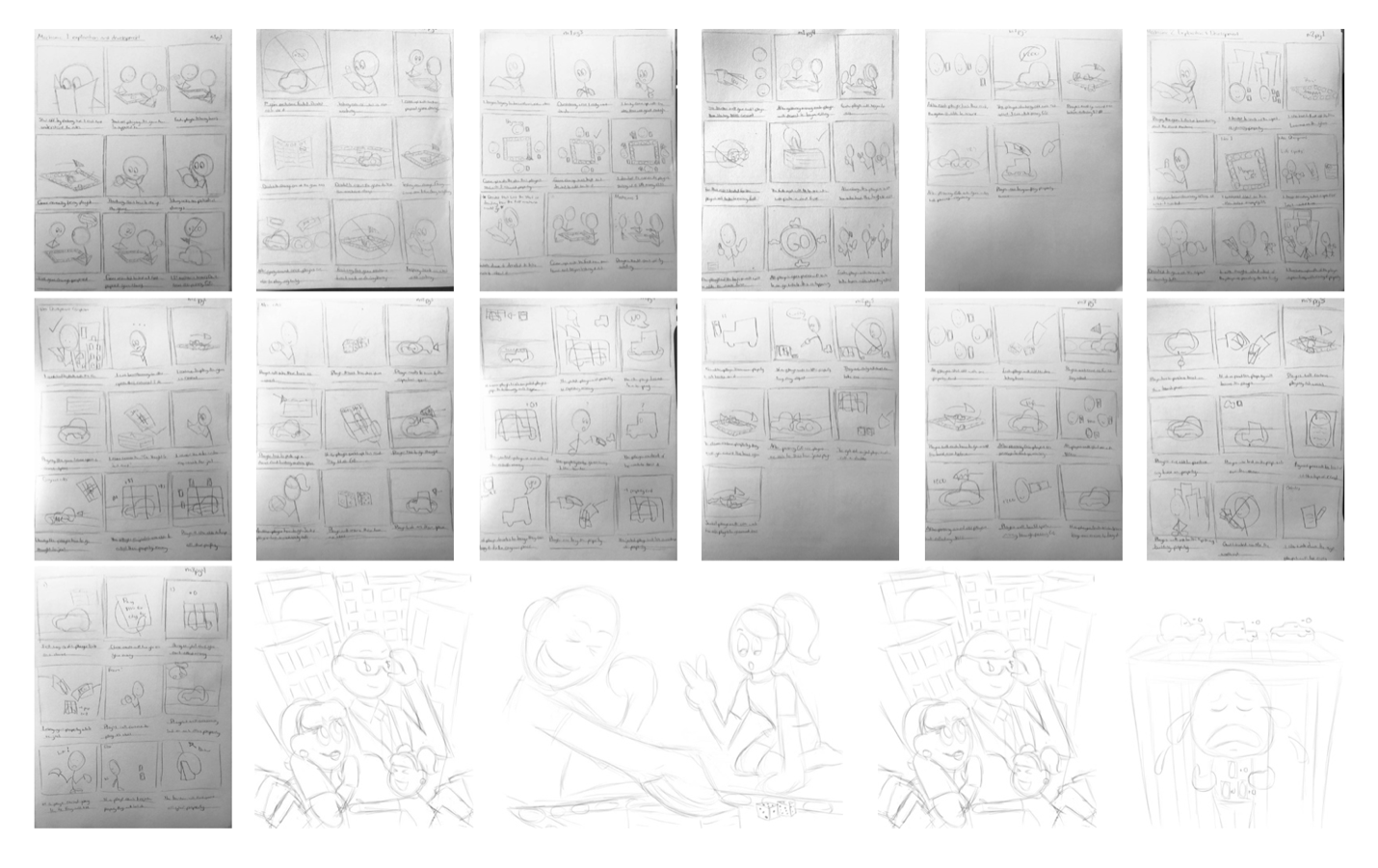
Assignment 4 | New Mechanics Animation Storyboards
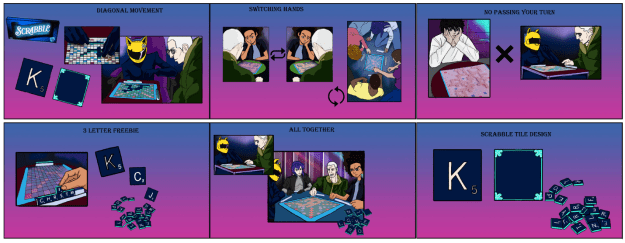
For this assignment, create one concept thumbnail storyboard, and one final storyboard for each new mechanic.
Storyboards are a vital part of the creative and production process. In addition to animation, they are used for everything from live-action films to motion graphics to keynote presentations.
Storyboards are used to visualize an action before many hours are spent producing and finalizing the animation. They are an outline of the action and are used to develop a strong visual story, spot weaknesses in plot or timing, or essential missing elements or shots.
Storyboards are much like comic books. You show the ‘key’ frames of animation while the action between frames is completed in the viewer’s mind. You can write in sound effects or use arrows to add emphasis to or illustrate actions. You should also write in narration below each frame to explain what kind of action is taking place.
Storyboards should start rough as pencil sketches or basic shapes because they will likely be changed. Once you have a more final structure, the storyboard is developed into a series of style frames.
Usually, when you are pitching a project idea to a client, you will show these more final style frame storyboards.
Think of the critical moments in your piece.
- What are the beginning, middle, and end of your piece?
- What are the other key ‘scene’ changes?
- How will the action progress?
- How will text, photos, illustrations, and other elements enter and exit the screen or transition from one frame to the next?
- How will shot composition, framing, and staging work together?
- Think about timing: how will your piece flow from beginning to end?
Start loose, preferably by sketching. But you can also use basic shapes and text in Photoshop and Illustrator. Don’t spend hours on each frame. The finalization will come later. Show ‘key’ frames, like a comic book. The action will be completed in the mind of the viewer.
Write descriptive narration under each frame to explain what kind of action is taking place. Use words like Zoom, Fade, Crossfade, Shrink, Grow, Pan left, Pan right, Pop, Flip, Spin, Float, Hold, etc.
Use arrows, if you like, to show the direction of the action.
Supplemental Information
- Animation Foundations: Storyboarding (LinkedIn Learning)
- Micah Buzan ANIMATION | How To Storyboard for Animation
- Bloop Animation | How to Storyboard
- Drawing with Jazza | How to make and edit storyboards in Photoshop (includes a .psd template that you can download if you want to create your storyboard in photoshop.
Assignment Requirements:
Concept Thumbnail Storyboards
- Brainstorm the actions for each (3) new mechanic
- Quick drawings that capture the actions in sequential order
- Write descriptive narrative for each frame
Student Examples:
Tunau-Spencer_RoughStoryboard.pdf


Richardson_Rough-Storyboard.pdf

Final Storyboards:
- Clean drawings that clearly communicate each key action
- Add descriptive narration and explain what is taking place
- Incorporate color and contrast to guide the viewer’s eyes
- Use the same aspect ratio as the final animation (16:9)
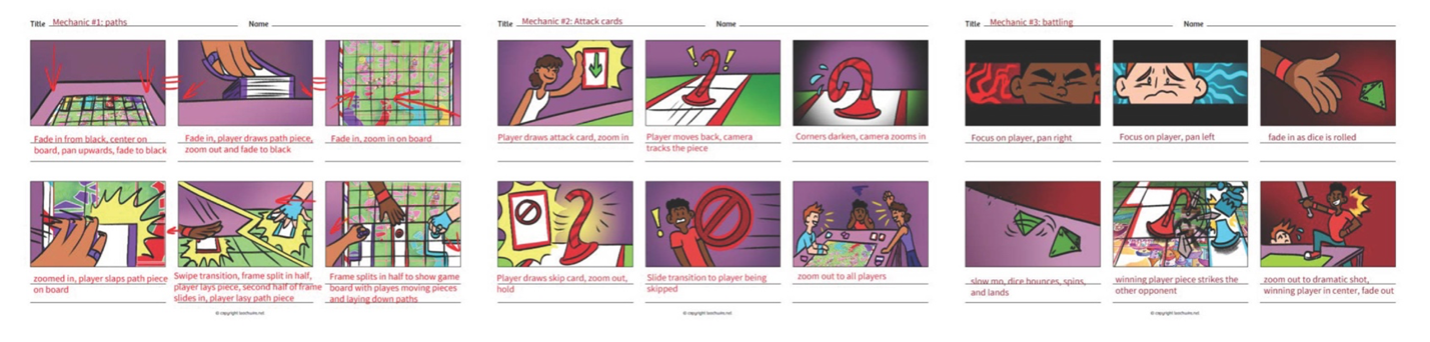
Student Examples:
Tunau-Spencer_FinalStoryboard.pdf

Richardson_Final-Storyboard.pdf

Assignment 5 | New Mechanics Animation
Requirements:
- Using Adobe Animate CC, animate your new mechanics illustrating how they affect gameplay and improve the player’s experience.
- Refine the storyboard’s actions, transitions, and camera angles to allow for smooth-flowing animations. Clearly label.
- Create an engaging story with a definite beginning (problem), middle (attempt to solve), and end (resolution).
- Incorporate framing and staging to develop all shot compositions.
- Develop transitions that ensure continuity — how text and other elements enter and exit the screen or transition from one frame to the next.
- Integrate timing allowing the animation to flow from beginning to end.
- Add appropriate audio/sound effects.
- 16:9 aspect ratio
- Export as MP4 from Adobe Animate
Submission:
- Submit the refined storyboard named “YourLastName_RefinedStoryboard.jpg” (or PDF)
- Submit the animation video named “YourLastName_Animation.mp4” (do not submit AVI)
- Submit the Adobe Animate file named “YourLastName_AA.fla”
Student Examples
Pasion
- Refined Storyboard (Links to another site)
*This student chose to make their refined storyboard into an animatic (not required).
- Animation (Links to another site)
Richardson
- Refined Storyboard
- Animation (Links to another site)
Bogue
- Refined Storyboard

- Animation(Links to another site)
Kennedy
- Refined Storyboard
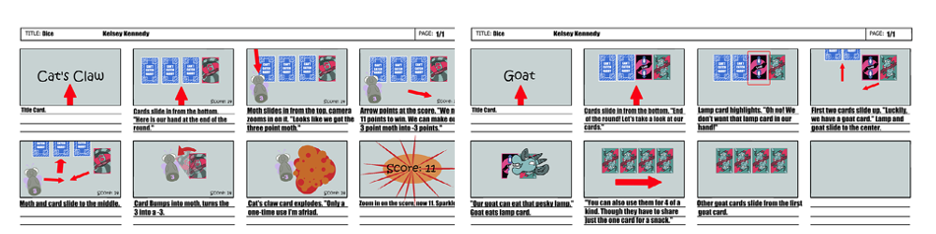
- Animation (Links to another site)

Assignment 6 | Game Pitch
For this assignment you will develop a Game Pitch in Adobe Express.
Adobe Express is a simple-to-use application that lets you easily turn your ideas into a post, page, or video. Express Webpagecreates web stories combining text, graphics, and video.
Adobe Express Tutorials
Game Pitch Requirements:
Refine all sketches, final artwork, storyboard, and animation based on peer reviews and critiques before creating the Express Page.
- Title
Game title and Your Name - Theme (the why) Describe the game’s genre and background story, what the players need to accomplish, how players understand the relationship between the components and mechanics, and how they should act in-game.
- Mechanics (the how)
Explain the existing mechanics, the systems that move your game from beginning to end, and how they affect gameplay. - New Game Mechanics Ideas
Describe your new mechanics. Include full-color illustrations of each mechanic detailing all sides/angles to illustrate how the mechanics work in relation to the game objects. Explain the different ways the game concludes through a win.
Include full-color illustrations of each mechanic in gameplay. - Storyboards
Describe the storyboards. Include final/refined storyboards. - Animation (link from Vimeo or YouTube)
Describe the animation. Include animation video. - Conclusion
Write a summary reflection describing your process.
Submit the link to your Adobe Express Page.
Student Examples
- Pasion: https://spark.adobe.com/page/AE8iO2vAODiYp/
- Richardson: https://spark.adobe.com/page/TK1Ck0MD23hJi/
- Boque: https://spark.adobe.com/page/Kekq5OEI4TalY/

Examples of Student Work from Module 1
Module 1 | Student Work Examples
- Monopoly: Cheaters Addition | Michael Paul https://express.adobe.com/page/IZtbnSGa9DOES/
- Chutes and Ladders Plus | Ryan Hiemenz https://express.adobe.com/page/tx8CPNAeE3w4L/
- The Goat Card | Kelsey Kennedy https://express.adobe.com/page/ijaNaRYJFQ0YM/
- Who Ate the Heart | Ray Young https://express.adobe.com/page/INtvzBOFza19a/
- Candy Land: Battle Royale | Malaya Zerbe https://express.adobe.com/page/Rn9MmI5PJ8ekZ/
- Cosmic Chess | Elizabeth Henry https://new.express.adobe.com/webpage/3Uu95TZwp0R4A
Module 2 | 2D Video Game Design
Overview:
For this module, you will be designing a new 2D video game, with a focus on character design, and creating a game design document for your game. The game document acts as a descriptive outline written for the development team. It contains the text, images, diagrams, and concept art necessary to illustrate design decisions.
The game design document describes the game’s selling points, target audience, gameplay, art, level design, story, characters, UI, assets, etc. Every game part requiring development is included in detail for the developers to implement each piece. The document is sectioned and divided so game developers can easily refer to and maintain relevant parts.
There is not a set industry template for GDDs. Genre, game studio size, designer strengths, etc. influence the conventions of game design documents. However, at a minimum, they will include the following:
- Title Page
The title page will include the title and a concept statement that summarizes the main idea of the game. - Genre
Discussion of the genre. What genre is the game? Including a summary of the key features of the genre and listing similar/competing games. - Target Audience: Target audience is the primary audience the game hopes to attract. Is the target audience based on age, geographic location, is it personality-driven? Is it based on motivation, gender, social media sites they use, etc.?
- Mechanics
Discuss the game mechanics: visuals, sounds, animations, physics, etc. It is crucial to be very specific! Discuss the tone and the underlying narrative. Describe the objective of the game. Describe the way the game works, from beginning to end. Be as descriptive as possible. - The Story
Here the story goes into great detail. Give elaborate descriptions of the story, the setting, and the characters. Include descriptions of the levels, user interface, and identification of the target audience. - Characters
The character section describes the distinct personalities and capabilities of the characters (who, what, when, where, why, how). Considerations: What are their wants, needs, motivations? Who are the protagonists, ancillary characters, etc.? Which character does the player play? Are there other key characters? - Setting
The setting section is where the game’s world takes shape. It contains descriptions of the scene(s) where the action takes place. - Levels
The levels section outlines the world in which the game takes place. A minimum of 2 levels is required. Include overall
look and feel, hazards the level presents, difficulty, objectives, etc. - Concept Art
A presentation of the process and finalized work for the following: Characters, environments, assets, UI, etc.
Overview of What You Will Do
Watch Ted Talk Videos
- Gaming can make a better world by Jane McGonigal
- The transformative power of video games by Herman Narula
- How video games turn players into storytellers by David Cage
Read a Chapter and a Book
- Challenges for Game Designers Download Challenges for Game Designers Chapter 1: The Basics
Due: March 16th - Creative Character Design by Bryan Tillman
Due: March 23rd
On the surface, Creative Character Design looks like a long read, but at least seventy percent of the pages are of artwork. It is a quick read and full of great advice and thoroughly explains the process of character design. Read the entire book – don’t skip pages, pay attention to the artwork.
The first few chapters discuss story and storytelling in character design and will also help you develop your GDD. I specifically want you to focus on chapters 5, 6, 7, which cover the processes involved in character development, the use of shape and silhouettes, the importance of form following function, the necessity of drawing from references, and aesthetics. The last chapters discuss adding the “Wow Factor” and how to bring it all together and present it.
Complete Quizzes – based on the videos, articles, and chapters.
Process Work: Design and create all original artwork
- Core Game Statement/Overview of Game/One-Page Document
- Character Concept Sketches
- Concept Sketches for Props, Environments, Level, & UI
- Rough Draft Game Design Document (GDD)
- Complete Character Development Sketches and Silhouette
- Complete Sketches for Props. Environment, Levels
Final Work: Develop final GDD, Concept Art, Animations
- Game Design Document (GDD)
- Concept Art (Characters, props, environments, level, & UI)
- Animations (Main character’s walk, run, jump/fall)
Assignment 1 | Core Game Statement
The core or core dynamic of a game is the single thing gameplay is about. Core statements are usually written to reflect the core mechanic or the core dynamic and sum up what the game is about. Describe how your game is played and what the user experiences.
Review the section on the Core of a Game in Chapter 1: Building Blocks in Challenges for Game Designers.
A core game statement usually contains the following sections: an introductory paragraph explaining the theme of the game; demographic breakdown, including target audience, genre, and intended platform(s); and a bullet-point feature list and a feature list breakout that explains each of the features in more detail. This is a one-page document that provides an overview of the game.
Requirements
- Working title
- Target platform
- Target age
- Game overview (minimum of 100 words describing the beginning, middle, and end of the story.)
- Game outline (minimum of 150 words covering player objectives, gameplay elements, and the genre.)
- Game hook (A list of the unique and cool features that set your game apart from others in the same genre. This could be innovative physis, story, or anything that sets it apart.)
- Competitors (List games that a publisher/developer would know, successful ones, and well-known ones especially – indie games that were awesome but only had 20 players would not reflect well on your game if you were seeking funding.
- Name your file “YourLastName_game-statement.docx” (docx or PDF)
Overview of Game example: One-page document example
You might also find the following chapters from Game Design Workshop helpful:
Chapter 3. Working with Formal Elements
Chapter 4. Working with Dramatic Elements
Chapter 6. Conceptualization
Check your writing on Grammarly.com before submitting it. Grammarly.com is free to use. There is a paid subscription that gives more in-depth editing features, but the free version works well for spelling and basic grammar errors.
Student Examples

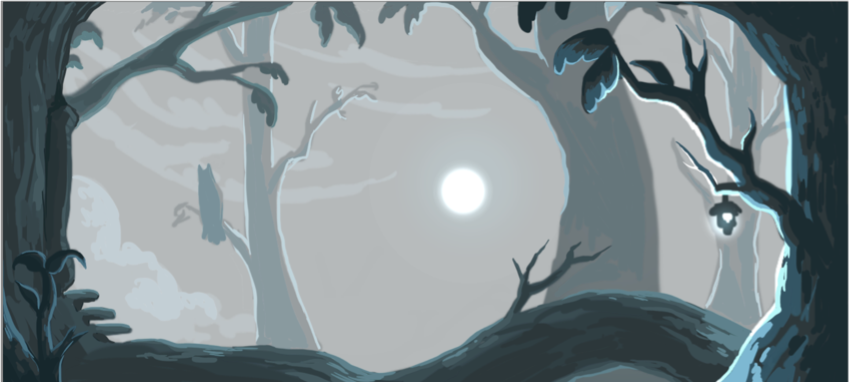
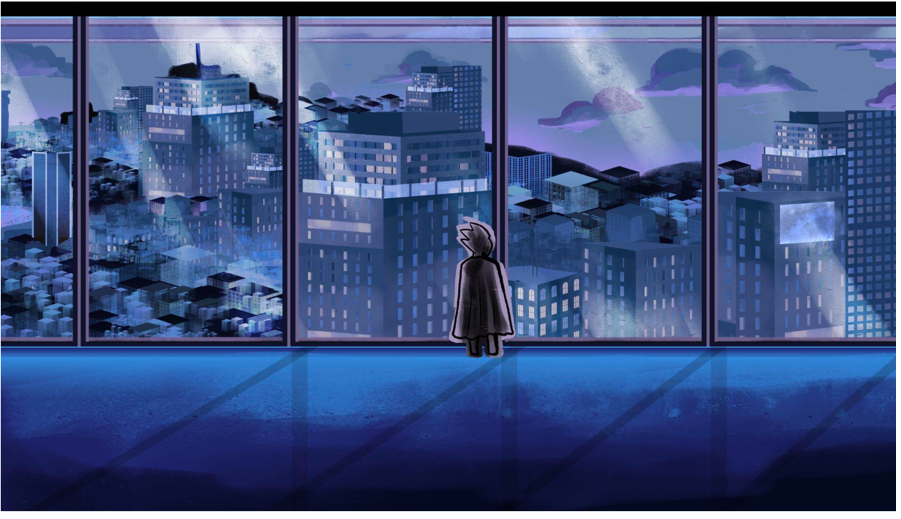
Assignment 2 | Concept Sketches for Assets: Props and Environments
Required Props Development Sketches:
- Minimum of 2 Pages with several thumbnail sketches that show exploration and development of props
- Props can be your collectable(s) and/or objects in the environment (trees/plants/buildings/etc.)
- Minimum 1 page of detailed sketches of at least five different props
- Label clearly
Concept Art Props Designs Inspiration
https://conceptartempire.com/props-concept-art-gallery/ (Links to an external site.)
Required Environment Concept Design Development Sketches:
- Minimum of 2 environments
- Multiple pages (minimum of 2 pages) with several thumbnail environment sketches that show exploration and development for each environment
- At least one, full-page detailed sketches of each environment (total 2 pages)
- Label clearly
Inspiration
- Jaza Animates | How to Design an Environment (Tutorial about the design process)
Environment Sketches Examples:
https://www.artstation.com/artwork/Qzxrl8 (Links to an external site.)
https://www.artstation.com/artwork/4Wl9L (Links to an external site.)
https://www.artstation.com/artwork/dXzkK (Links to an external site.)
Student Examples


Assignment 3 | Character Concept Sketches, Silhouettes, and Development
Requirements
Watch:
- What is Concept Art? (34 minutes)
- Learning Character Development and Design (1hour 25 minutes)
Read:
- Creative Character Design (the entire book and the gallery)
- Character Design: How to Create Unforgettable Characters for Timeless Video Games Storytelling
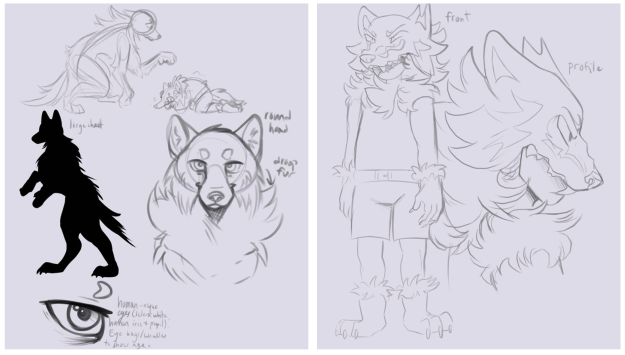
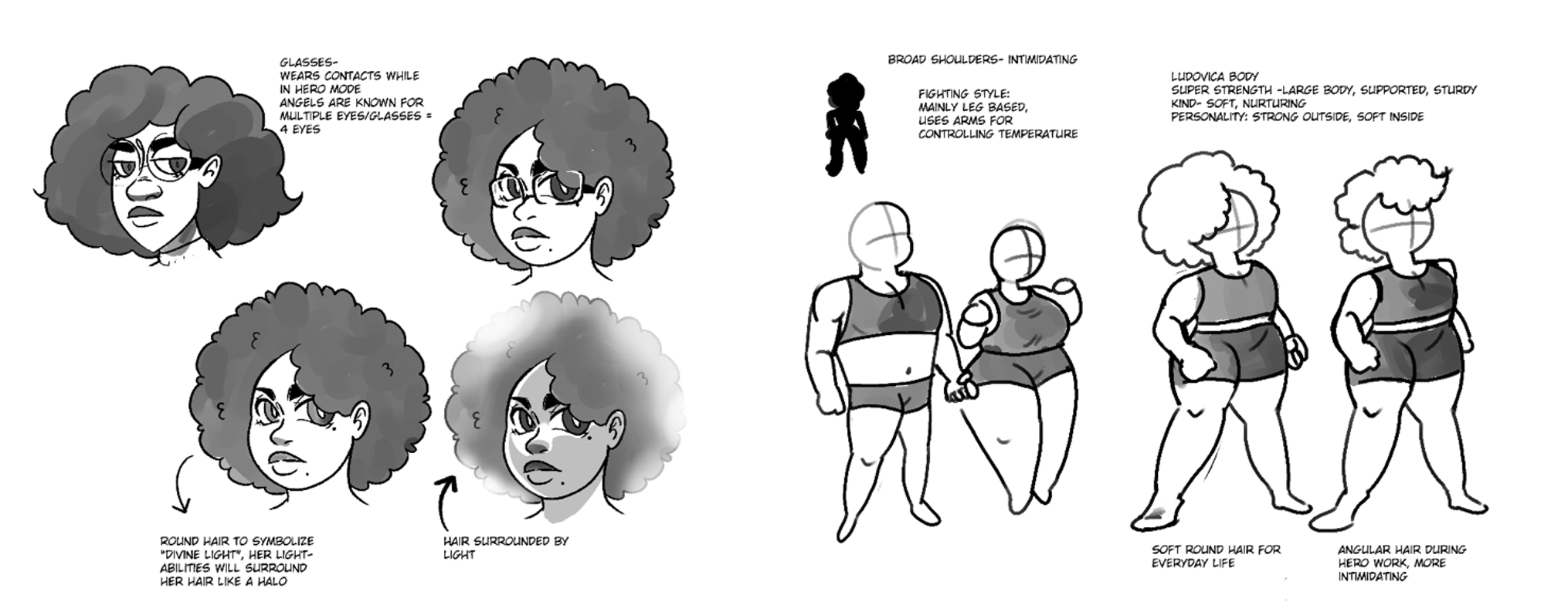
Required Character Sketches
- Design and develop 2 characters, 2 different versions of a main character
- Character Design Silhouette Thumbnails (minimum of 5 per character) – full-body
- Incorporate concepts from Creative Character Design
- Multiple pages (minimum of 3 for each character), each page with numerous rough sketches that show exploration and development, and various poses. Sketches start with an initial idea and follow through to a more developed character. Total = minimum of 6 pages
- Identify archetypes as described in Creative Character Design
- Develop the character’s story (who, what, when, where, why, how) detailing everything about them. This does not count as a sketch page.
- Add descriptive labels to all sketches.
- Character Design Silhouette Thumbnails (minimum of 5 per character) – full-body
- Choose 1 character to further refine
- Two pages of detailed character sketches (this should include numerous sketches that show exploration and development, various poses, and numerous detail sketches)
- Full-Body Three-point turnaround sketches
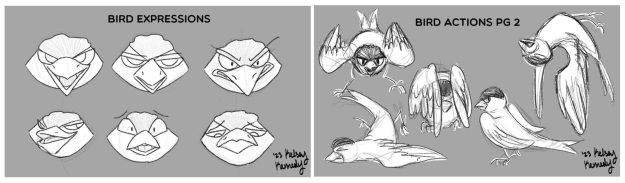
- Full-Body Action poses sketches (minimum of 3)
- Facial expressions sketches (minimum of 5)
Questions to consider:
- How do you convey personality through appearance? (Think Overwatch)
- How do you convey rank or hierarchy?
- How does the environment impact your character’s physical features? Posture? Skin? Height? Weight? Body language? Stance?
- How do religious or cultural influences impact your character’s features?
IMPORTANT: If you are photographing your sketches, take the time to shoot them in decent light, make sure the perspective is not skewed and crop out the background. If the page of sketches you are photographing is horizontal, make sure that the image you upload is also horizontal. Your sketches are only as good as the documentation that you submit!
Student Examples




Assignment 4 | Game Design Rough Draft Assignment
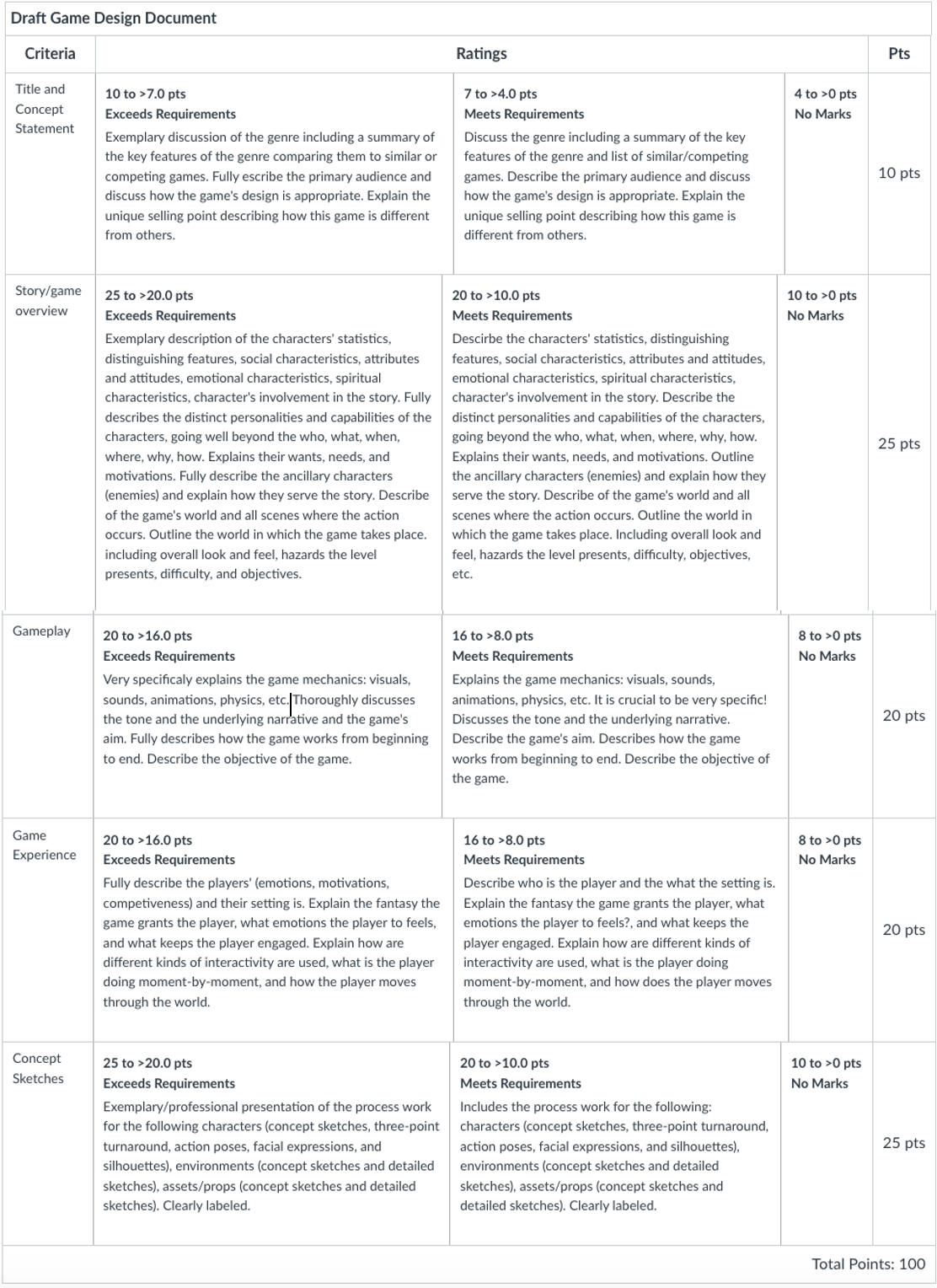
GDD Rough Draft Requirements
- Title and concept statement (Finalized title and overview from game concept/statement)
- Genre: Give a full discussion of the genre including a summary of the key features of the genre and list of similar/competing games.
- Platform
- Target Audience and target rating (Describe the primary audience and discuss how the game’s design is appropriate.)
- Unique Selling Points: Critically important – What makes your game stand out? How is it different from all other games?
- Story/game overview
- Character: Their basic statistics, distinguishing features, social characteristics, attributes and attitudes, emotional characteristics, spiritual characteristics, character’s involvement in the story, basic statistics) Complete description of the distinct personalities and capabilities of the characters, going well beyond the who, what, when, where, why, how. Fully explains their wants, needs, and motivations.
- Setting: Full description of the game’s world and all scenes where the action occurs.
- Levels: Outline the world in which the game takes place. Including overall look and feel, hazards the level presents, difficulty, objectives, etc.
- Gameplay
- Mechanics and Controls: Fully explains the game mechanics: visuals, sounds, animations, physics, etc. It is crucial to be very specific!
- Mission and Objectives: Discuss the tone and the underlying narrative. Describe the game’s aim. Describe how the game works from beginning to end.
- Game Experience
- Who is the player? What is the setting? What is the fantasy the game grants the player? What emotions do you want the player to feel? What keeps the player engaged for the duration of their play?
- How are different kinds of interactivity used? What is the player doing moment-by-moment? How does the player move through the world?
Concept sketches including:
Complete Character Development
- Character sketches your character (this should include multiple pages, each with numerous sketches that show exploration and development, various poses, and numerous detail sketches)
- Three-point turnaround sketches
- Action pose sketches (minimum of 3)
- Facial expressions (minimum of 5)
- Character Design Silhouette Thumbnails (minimum of 5)
Required Props Development Sketches
- Several thumbnail sketches that show exploration and development
- Detailed sketches of at least five different props
Required Environment Concept Design Development Sketches
- Several thumbnail environment sketches that show exploration and development
- At least two full-page detailed sketches
Submit your GDD as a word document (.doc), name your file “YourLastName_GDD-RD”
Student Examples
Assignment 5 | Final Concept Art
Along with your final GDD, you will be turning in the final concept art sheets. In the GDD itself, incorporate model sheets, development sketches, drawings, and full-color illustrations.
As you continue to develop your concept art, keep in mind the following:
Form follows function: Do your designs look like they will work/function? Are you looking at references to make your designs believable?
Color: Do your designs reveal that color is carefully considered? Do your designs show an understanding of the psychological effects of color?
The colors and color schemes you use for your character can say a lot about the character. Color can indicate the culture, traditions, period, geographical location, or personal preferences of the character. Moreover, color theory comes into play almost immediately, and the colors you use will impress specific characteristics upon the viewer. Certain colors communicate certain emotions, and the human mind picks these up almost immediately subconsciously.
You may find this article helpful: What Disney Villains Can Tell Us About Color Psychology
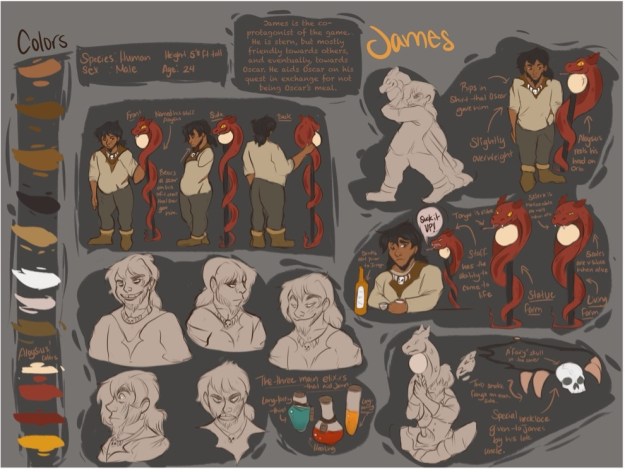
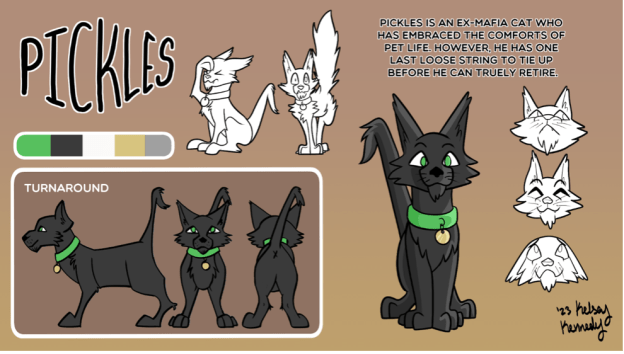
Model Sheet: A model sheet is a combination of the full-body pose, turnaround, facial expressions, head turns, action poses, and descriptions of anything about the character’s appearance that is important for every artist to know.
What to Include in the Model Sheet
- The name of your character and a short, written description of the character’s personality. This should be no longer than a short paragraph but should give us a quick explanation of the character’s role in the game.
- Full Body Shot. First, every character sheet includes an image of the character in a natural, relaxed stance, which provides a reference point for the character’s overall look and proportions. Include assets the character has such as sword, wand, crystal, etc.
- Action Poses
- Head Shots (with emotions)
- Turnaround
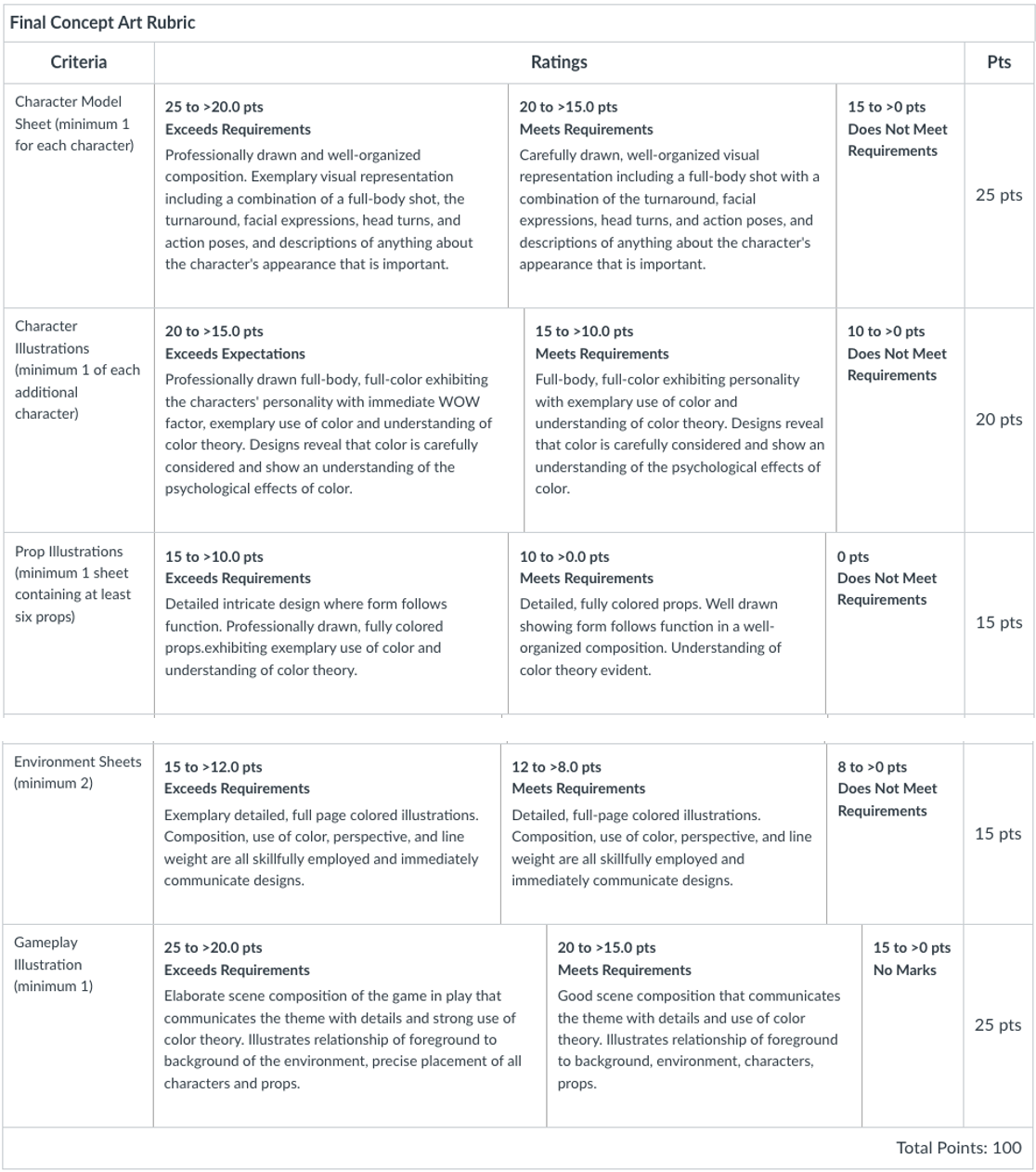
Final Concept Art Requirements:
- Minimum two complete character full-color model sheets (one per character) of the full-body pose, turnaround, facial expressions, head turns, action poses, and descriptions of the character’s appearance
- Minimum one full-body, full-color illustration of each additional character (one character per sheet)
- Minimum one props sheet containing at least six detailed and fully colored prop illustrations
- Minimum 2 environment sheets, each containing a detailed and fully colored illustration
- Minimum of one detailed and colored illustration of the game in play.
Student Examples

Baker

Assignment 6 | Final Game Design Document
Submit a carefully considered, articulate, detailed, and organized GDD which is an improved and expanded version of the Rough Draft GDD and includes exceptional final artwork that displays exploration and thorough development.
Submit your GDD as a word document (.doc), name your file “YourLastName_GDD”
Your document must include the following:
- Title and concept statement (Finalized title and overview from game concept/statement)
- Genre: Give a full discussion of the genre including a summary of the key features of the genre and list of similar/competing games.
- Platform
- Target Audience and target rating (Describe the primary audience and discuss how the game’s design is appropriate.)
- Unique Selling Points: Critically important – What makes your game stand out? How is it different from all other games?
- Story/game overview
- Characters: Their basic statistics, distinguishing features, social characteristics, attributes and attitudes, emotional characteristics, spiritual characteristics, character’s involvement in the story, basic statistics) Complete description of the distinct personalities and capabilities of the characters, going well beyond the who, what, when, where, why, how. Fully explains their wants, needs, and motivations.
- Enemies: Outline the ancillary characters and explain how they serve the story.
- Setting: Full description of the game’s world and all scenes where the action occurs.
- Levels: Outline the world in which the game takes place. Including overall look and feel, hazards the level presents, difficulty, objectives, etc.
- Gameplay
- Mechanics and Controls: Fully explains the game mechanics: visuals, sounds, animations, physics, etc. It is crucial to be very specific!
- Mission and Objectives: Discuss the tone and the underlying narrative. Describe the game’s aim. Describe how the game works from beginning to end.
- Game Experience
- Who is the player? What is the setting? What is the fantasy the game grants the player? What emotions do you want the player to feel? What keeps the player engaged for the duration of their play?
- How are different kinds of interactivity used? What is the player doing moment-by-moment? How does the player move through the world?
- Final concept art including:
- Minimum two complete character model sheet ( 1 for each character)
- Minimum a full-body, full-color illustration of each additional (ancillary) character (one sheet each)
- Minimum one props sheet containing at least six detailed and fully colored prop illustrations
- Minimum 2 environment sheets, each containing a detailed, full-page and fully colored illustration.
- Minimum of one detailed and colored illustration of the game in play that includes all of the previous bulleted items
*Before submitting your final GDD, run your text through Grammarly, a free online writing assistant. You may even want to compose your written content in Grammarly; I find it incredibly helpful in the writing process.
https://www.grammarly.com/ (Links to an external site.)
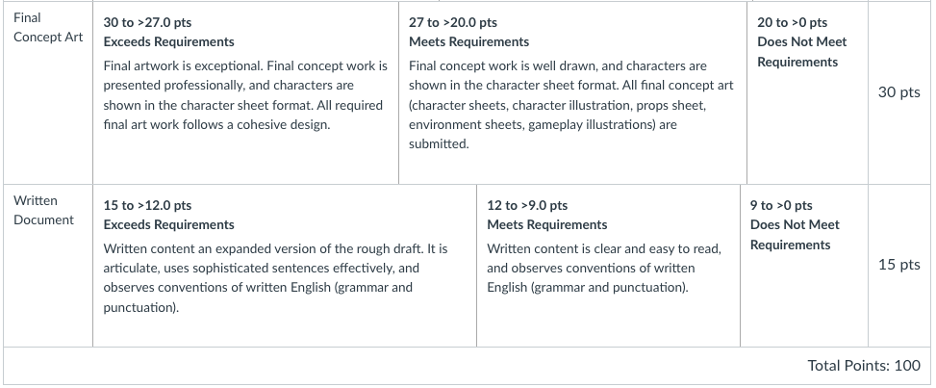
Description of an A 100 points GDD
The game concept is original. Written content is articulate, uses sophisticated sentences effectively, and observes conventions of written English. It contains thorough descriptions of the background story, a detailed description of gameplay and essential rules, complete bios for each character with the attributes that contribute to the gameplay. It contains a thorough explanation of mechanics. Excellent document structure.
Concept artwork is exceptional. Concept sketches display exploration and thorough development. Final concept work is presented professionally, and characters are shown in the character sheet format. All final concept works follow a cohesive design.


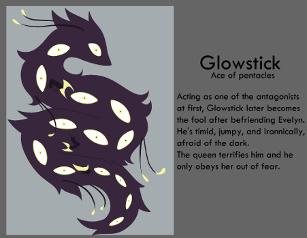
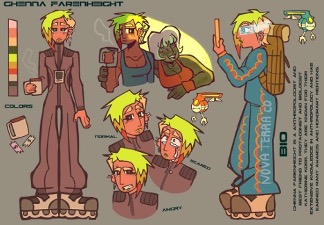
Student Work Examples | Final Game Design Documents
Assignment 6 | Character Animation: Walk, Run and Body Mechanics
In this assignment, watch the required tutorials and complete and submit the two required tutorials below.
Watch
The Illusion of Life (less than 3 minutes) by Cento Lodigiani
The 12 basic principles of animation were developed by the ‘old men’ of Walt Disney Studios, amongst them Frank Thomas and Ollie Johnston, during the 1930s. These principles came as a result of reflection about their practice and through Disney’s desire to use animation to express character and personality. Check also the animated gif gallery: the12principles.tumblr.com/.
Animation Foundations: Walk Cycle Basics (1 hour 57 minutes)
There are four primary poses of a walk cycle, and the sequence in which they are animated is very important. In this 2D animation tutorial, Dermot O’ Connor introduces the basics of all walk cycles. The principles apply to any animation student, regardless of software.
First, he reviews the poses—contact, down, passing, and high point—and the creative decisions you must make about timing, frame rates, and placement. (Traditionally, walk cycles can be animated in place or across the screen.) In the following chapters, Dermot animates a character walking in profile and from a front view. These two projects give you opportunities to see animation techniques, such as creating poses and in-betweens and troubleshooting arcing and timing issues, in action.
2D Animation: Character & Attitude Walk Cycle (57 minutes)
Once you’ve completed a basic walk cycle, it’s time to add character. Animator Dermot O’ Connor shows how to take a basic walk and go beyond, building in personality, exaggeration, and attitude. Learn how to animate bipedal motion, stomps, sneaks, goofy walks, and turn walks into full-on runs. Dermot also shows how to avoid common pitfalls such as jagged arcs. These techniques are 2D animation classics, and must-have skills for any animator, regardless of software.
Optional Tutorial to Watch:
2D Animation: Animal Walk Cycles (42 minutes)
Required Tutorials to Complete and Submit:
Name your files “YourLastName_WC.fla” and “YourLastName_RC.fla”
Assignment 7 | Final Character Animation
Animate the main character in Adobe Animate CC.
Animation Requirements
- Sketch in detail the four primary poses of your main character’s walk cycle and run cycle, including arm and body motion—contact, down, passing, and high point and in-betweens. Draw each cycle on a separate page. Label.
- In Adobe Animate, CC animate four of your main character’s actions – walk, run, jump, attack in Adobe Animate CC. If your character does not attack, choose the fourth action.
- Combine into one animation that flows seamlessly from one action to the next paying close attention to continuity.
- Utilize 3 of Adobe Animates 4 tweeting options, classic, motion, shape, frame-by-frame.
- Add audio/sound effects for all actions.
- Include an ending that illustrates the character’s appeal.
- Incorporate the 12 principles of design building in personality, exaggeration, and attitude; especially squash and stretch, anticipation, staging, follow through and overlapping, slow in and out, timing, arcs, exaggeration, and appeal.
- Incorporate the game’s environment in the background/environment.
- Aspect ratio 16:9
- 24 fps or 30 fps
Submission Requirements
- Walk and run cycle sketches files named “YourLastName_Walk.jpg” and “YourLastName_Run.jpg”
- Adobe Animate CC file named “YourLastName_CA.fla”
- MP4 named “YourLastName_CM.mp4”
LinkedIn Learning Tutorial Handouts
Student Examples
Pasion
Character Walk

Character Run

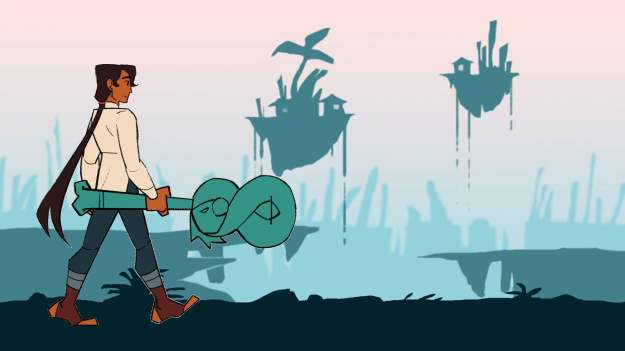

Student Work Examples | Final Character Animations https://vimeo.com/user/15806543/folder/23683538
Young https://vimeo.com/1045415082
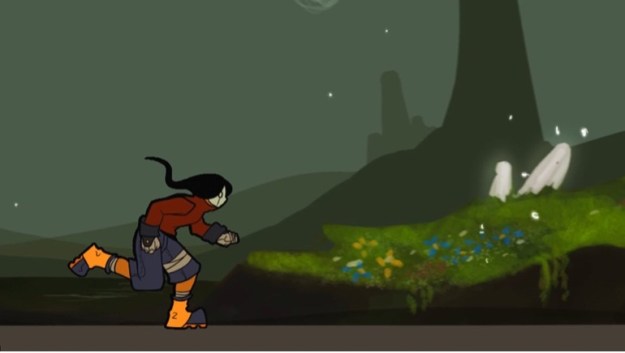
Kennedy https://vimeo.com/1045412158

Jimenez Ramos https://vimeo.com/1045411165

Jennings https://vimeo.com/1045410630
Appendix
- Reading List and Reference
- Syllabus
Reading List and Reference
How to Learn Board Game Design and Development https://code.tutsplus.com/how-to-learn-board-game-design-and-development–gamedev-11607a
Animation Foundations: Storyboarding (LinkedIn Learning) https://www.linkedin.com/learning/animation-foundations-storyboarding/welcome?u=76264346How to Learn Board Game Design and Development
Micah Buzan ANIMATION | How to Storyboard for Animation
Bloop Animation | How to Storyboard https://www.bloopanimation.com/how-to-storyboard/
Drawing with Jazza | How to make and edit storyboards in Photoshop (includes a .psd template that you can download if you want to create your storyboard in photoshop. https://www.youtube.com/watch?v=7cWVdK5xyTs
Adobe Animate Essential Training (LinkedIn Learning) https://www.linkedin.com/learning/adobe-animate-essential-training
TipTut’s Intro to Adobe Animate Series:
Intro to Adobe Animate [1/4] | Beginners Tutorialhttps://www.youtube.com/watch?v=7huMYp7WpsI
Intro to Adobe Animate [2/4] | Beginners Tutorial
https://www.youtube.com/watch?v=wpmNclYMWTc
Intro to Adobe Animate [3/4] Beginner Tutorial
https://www.youtube.com/watch?v=P6kgdGBzgS4
Intro to Adobe Animate [4/4] | Beginners Tutorial
https://www.youtube.com/watch?v=Hv2ZOd8fFAg
Create a Web Page using Adobe Express https://helpx.adobe.com/express/create-and-edit-documents-and-webpages/create-webpages/design-webpage.html
Telling a Story with Adobe Creative Cloud Express (LinkedIn Learning) https://www.linkedin.com/learning/telling-a-story-with-creative-cloud-express/telling-a-story-with-adobe-creative-cloud-express?u=76264346
Game Design Workshop by Tracy Fullerton
Challenges for Game Designers by Brenda Brathwaite and Ian Schreiber
What is Concept Art? LinkedIn Learning https://www.linkedin.com/learning/what-is-concept-art/design-is-not-illustration?u=76264346
Jaza Animates | How to Design an Environment https://www.youtube.com/watch?v=uPD9lNj01V4&ab_channel=Jazza
What is Concept Art (LinkedIn Learning) https://www.linkedin.com/learning/what-is-concept-art/what-is-concept-art?resume=false&u=76264346
Learning Character Development and Design (LinkedIn Learning) https://www.linkedin.com/learning/learning-character-development-and-design/tools-of-the-trade?u=76264346
Creative Character Design by Brian Tillman
Character Design: How to Create Unforgettable Characters for Timeless Video Games Storytelling https://www.gamedesigning.org/learn/character-design/
What Walt Disney Villains Can Tell Us About Color Psychology https://venngage.com/blog/disney-villains/
The Illusion of Life https://vimeo.com/93206523
Animation foundations: Walk Cycle Basics (LinkedIn Learning) https://www.linkedin.com/learning/2d-animation-walk-cycles-basics/welcome?u=76264346
2D Animation Character & Attitude Walk Cycles (LinkedIn Learning) https://www.linkedin.com/learning/2d-animation-character-attitude-walk-cycles/welcome?resume=false&u=76264346
2D Animation: Animal Walk Cycles (LinkedIn Learning) https://www.linkedin.com/learning/2d-animation-animal-walk-cycles/eadweard-muybridge?u=76264346
How to Animate a Walk Cycle in Adobe CC https://www.youtube.com/watch?v=mCe1xtx-nK4
How to Animate a Run Cycle in Adobe CC https://www.youtube.com/watch?v=dqrq-TT-iFU
Syllabus
ART3070 Introduction to Interactive Design
Course Syllabus
Course Description
This course provides students with a theoretical and conceptual understanding of the field of game design and practical exposure to designing a game. Topics covered include iteration, mechanics, dynamics, flow theory, the nature of fun, game balance, and user interface design. The primary focus is on 2D asset creation and game design documentation.
Course Requirements & Prerequisites: Art 2070
Required Text & Readings (PDF files are linked to below)
- Creative Character Design by Bryan Tillman
- Challenges for Game Designers by Brenda Brathwaite and Ian Schreiber
- The Art of Game Design by Jesse Schell
- Game Design Workshop by Tracy Fullerton
Required Software
Adobe Creative Cloud
- Photoshop
- Illustrator
- Animate
If you have not already signed up for your free Adobe CC account, you may do so here:
https://ecu.teamdynamix.com/TDClient/1409/Portal/KB/ArticleDet?ID=67331
Required Materials
- Drawing paper and drawing materials for sketches, mockups, and drawings.
- Wacom Screen Tablet Pen / or a digital drawing tablet for working outside of class.
Currently, there are two pen options for students to purchase:
and
Materials Recommended (but not required)
- A portable Hard Drive, 500G – 1TB SSD
Student Learning Outcomes
Acquire and apply a proficient understanding of game design.
Practice creative concept process through research, design, and development of a game design document. Demonstrate advanced analysis and exploration of an existing game and level design.
Critically analyze students’ artistic development, comfortably consider criticism, and critique peers’ work. Apply problem-solving skills and make revisions based on this feedback.
Conduct of the Course
This course follows a hybrid model meeting once a week. Course content is delivered through Canvas. Your attendance, in person, is expected. Classroom time represents lectures, instructor demonstration, class exercises, design and production assignments, work on projects, and critique.
Most course content will be available on Canvas. Additional communication and collaboration platforms such as Microsoft Teams, Discord, and Cisco Webex will also be accessed. To download the Cisco Webex App: https://ecu.teamdynamix.com/TDClient/1409/Portal/KB/ArticleDet?ID=67446
Students may be required to engage in online discussion forums and to engage in all activities by deadlines posted. When posting on the discussion boards and chat rooms, it is essential to understand how to interact online and use proper netiquette. You can read more about the rules of netiquette here: http://www.albion.com/netiquette/corerules.html
I seek to create an online environment in which individuals can openly share their thoughts, viewpoints, and ideas. Class members are expected to respect the diverse backgrounds of other class members.
Students are expected to contribute in critiques and discussions actively. Individual participation and conduct will count as a significant portion of each student’s final grade.
Class Expectations
Participation is mandatory. Students are expected to contribute during critiques and class discussions actively. Individual participation and conduct will count as a significant portion of each student’s final grade.
All course projects are mandatory and are to be completed and submitted to Canvas on the due date. Late projects may not be included in the critique and docked 10%. Late work will not be accepted past one week (seven days) from the due date.
Attendance Policy For information on university excused absences see http://www.ecu.edu/cs-studentaffairs/dos/excused_absences.cfm Attendance is mandatory and missing more than One Class will result in a Grade Reduction. Missing Three Classes will result in a grade of “F” for the course regardless of the project grade.
- Students must be in class on time, arriving late to class three times will count as an unexcused absence. Missing more than 15 minutes of class time will be considered an unexcused absence; this includes leaving class early w/o permission.
- Students must come to class prepared! They should have the required materials and due assignments. Arriving unprepared may result in an unexcused absence.
- Missing class during a critique will result in an unexcused absence and an F for the due assignment.
- Attendance is required. Since we only meet face to face once a week (Wednesdays 11 AM – 1:50 PM), expect an interim or final critique at each class meeting.
Letter Grading
Letter grades will be assigned based on the number of points earned from assignments. See the conversion table below.
| Grading Scale | |||
| Grade | Grade Scale | GPA | |
| A | 93-100 | 4.0 | Achievement substantially exceeds basic course expectations |
| A- | 90-92.99 | 3.7 | |
| B+ | 87-89 | 3.3 | |
| B | 83-86.99 | 3.0 | Achievement exceeds basic course expectations |
| B- | 80-82.99 | 2.7 | |
| C+ | 77-29.99 | 2.3 | |
| C | 73-76.99 | 2.0 | Achievement adequately meets basic course expectations |
| C- | 70-72.99 | 1.7 | |
| D+ | 67.69.99 | 1.3 | |
| D | 63-66.99 | 1.0 | Achievement falls below basic course expectations |
| D- | 60-62.99 | .7 | |
| F | 0-59.99 | 0 | Failure – achievement does not justify credit for the course |
| I* | Incomplete | * | (granted for deficiency in quantity, not quality, of work) |
*If the student or an immediate family member has a serious illness, an incomplete may be requested. The final decision to award an incomplete is at the discretion of the professor.
Weighted Grades
Quizzes 10%
Participation 20%
Process Work 30%
Final Projects 40%
Project Evaluation
Student work is evaluated on the following criteria:
- Fulfillment of assignment objectives
- Technical execution
- Conceptual and physical investment of time
- Aesthetic and conceptual quality of the finished work
Other University Policies
Assessment In this course you will be asked to participate in assessment activities that are not graded as part of your course requirements.
Academic Integrity
As a member of the ECU community, students are expected to uphold this value daily. Academic integrity is not only important to your education and learning, but also to the integrity of your degree and that of the entire university community. As a member of this academic community you are expected to: Review the entire Academic Integrity Policy; Consult a faculty member if you are unsure if a behavior is a violation of the Academic Integrity policy; If you observe an academic integrity violation, report it to the faculty member immediately. Academic integrity is a fundamental value of higher education and East Carolina University; therefore acts of cheating, plagiarism, falsification, or attempts to cheat, plagiarize or falsify will not be tolerated. Should I determine that an academic integrity violation has taken place, I reserve the right either to assign a grade penalty or to refer the case to the Office of Student Rights and Responsibilities for an Academic Integrity Board hearing. The minimum grade penalty that I will assign is an F for the assignment/course. Should it come to my attention that you have had a prior academic integrity violation, or if there are other aggravating circumstances, I will refer the case directly to the Office of Student Rights and Responsibilities. Should the Academic Integrity Board determine that you committed an academic integrity violation, you may be assigned a grade penalty and/or any other sanction allowed in the student code of Conduct, up to and including suspension from the University.
Information on academic integrity, the student code of conduct, and the rights and responsibilities of students are available at: https://osrr.ecu.edu/policies-procedures/.
Disruptive Academic Behavior
East Carolina University is committed to providing each student with a rich, distinctive educational experience. To this end, students who do not follow reasonable standards of behavior in the classroom or other academic settings may be removed from the course by the instructor following appropriate notice. Students removed from a course under this policy will receive a grade of “W” according to university policy.
Title IX Statement
East Carolina University is committed to equality of opportunity and does not discriminate against applicants, students, employees, or visitors based on race/ethnicity, color, creed, national origin, religion, sex, sexual orientation, age, veteran status, political affiliation, genetic information, or disability. Any student who has an issue or concern regarding his or her rights under Title IX may inquire first with the Dean of Students Office.
Students with Special Assistance
East Carolina University seeks to comply fully with the Americans with Disabilities Act (ADA). Students requesting accommodations based on a disability must be registered with the Department for Disability Support Services before receiving accommodations. Please visit their office in Slay 138 or call (252) 737-1016 (Voice/TTY). https://dss.ecu.edu/
Observance of Religious Holidays
Students will not be penalized for missing a class, lab, or examination due to the observance of a religious holiday. A written statement must be submitted to the instructor before the end of the second class meeting if any schedule conflict exists. Assignments that fall due on a religious holiday should be submitted early unless prior arrangements were made with the instructor.
Continuity of Instruction
If face-to-face classes are suspended due to a pandemic or other catastrophe, I will strive to continue instruction to those that can participate. If and when face-to-face classes are suspended, you will receive an email that details how we will communicate, where you can locate course information, and what you can expect during this time. I realize that some of you may be affected by the event and not able to participate, however, I will continue to provide instruction to those with access to the internet.
Emergency Weather Statement In case of inclement weather or emergency ECU will post information at the following website: http://www.ecu.edu/alert/
Academic & IT Support
Joyner Library: Please visit the ECU Joyner Library for help with on and off-campus questions or regarding issues accessing their resources. Joyner Library offers a variety of resources to support distance education students. https://library.ecu.edu/help/
IT Help Desk: The ECU IT Help Desk can assist with IT-related questions. For more information please visit: https://itcs.ecu.edu/call-help-desk/
Linkedin Learning: ECU Provides LinkedIn Learning (previously Lynda.com) access for all students. Use this valuable resource to supplement any gaps in knowledge, especially as it relates to any technical skills required to complete assignments.
Canvas Help: For any Canvas-related questions, use the Canvas Help button.
Caveat Statement
This syllabus represents a written contractual agreement between us. Occasionally, it may be necessary to revise this syllabus to meet students’ needs. I reserve the right to revise this syllabus if the need arises. Advance notification will be provided to you.
 cagedflight